
On this page
Words in this article
We build Gushi. Read this with that in mind. Below we show each step with screenshots from the app, say when a list of your own is the better choice, and where it stops.
Why make your own list
Most apps teach their own course in their own order. That works until the words you need are not the words the app is teaching. Five common cases:
- Your class uses a book we do not follow. Gushi follows HSK 3.0 and 17 textbooks. If yours is not one of them, type or import its word list once, lesson by lesson.
- Your teacher hands out word lists. A sheet a week, a test on Friday. Put the sheet in, and the review is planned for you.
- You already have an Anki deck. Years of cards do not have to stay behind. Gushi reads the deck and keeps its subdecks as lessons.
- You learn for something specific. A trip, a job, a TV series, a partner's family. Search the words you need and leave out the rest.
- You want the most useful words first. The picker shows the 10,000 most common words in order, so you can take the top 500 and go on from there.
A list of your own does not change how Gushi teaches. Each word still gets its story, its parts, its audio and its place in the review plan. Only the order and the choice of words are yours.
Way 1: pick words from the 10,000 most common
This works on the iPhone, on Android and in the browser. The screenshots are from the web app.
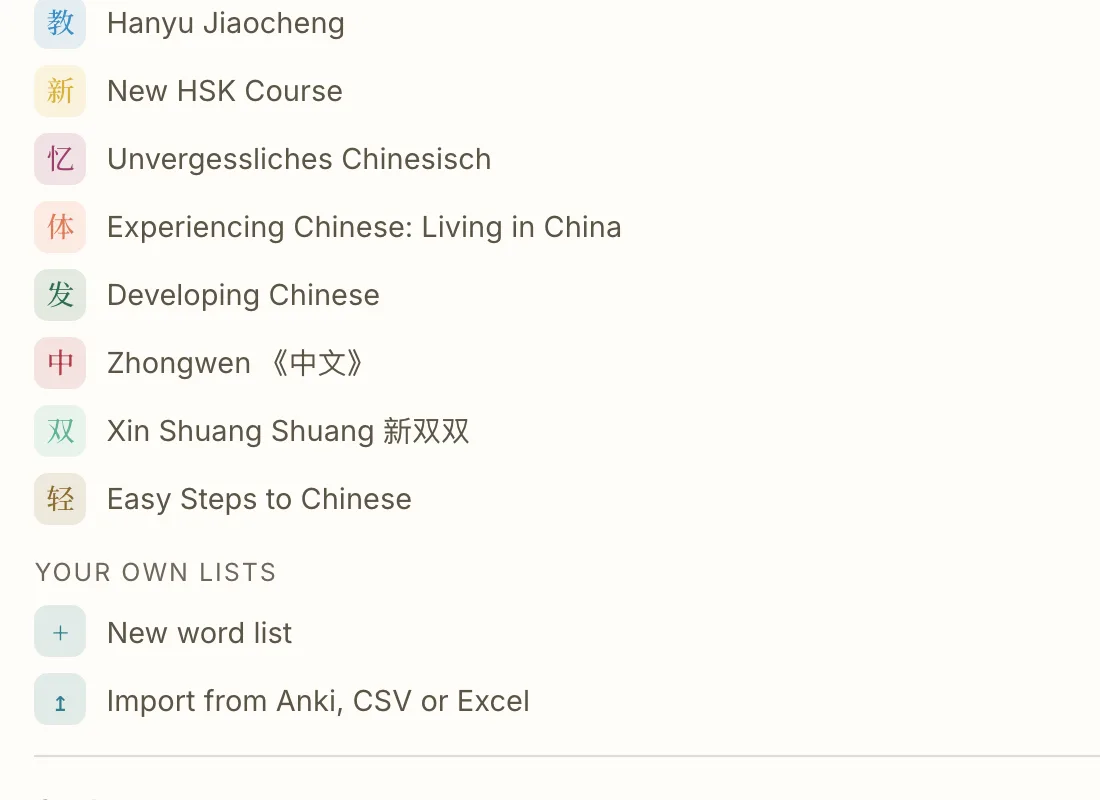
1. Open "Your own lists". On a new account it is the first choice when Gushi asks how you want to learn. Later, open Settings, then Change learning path. At the bottom of the list sits Your own lists, with New word list.
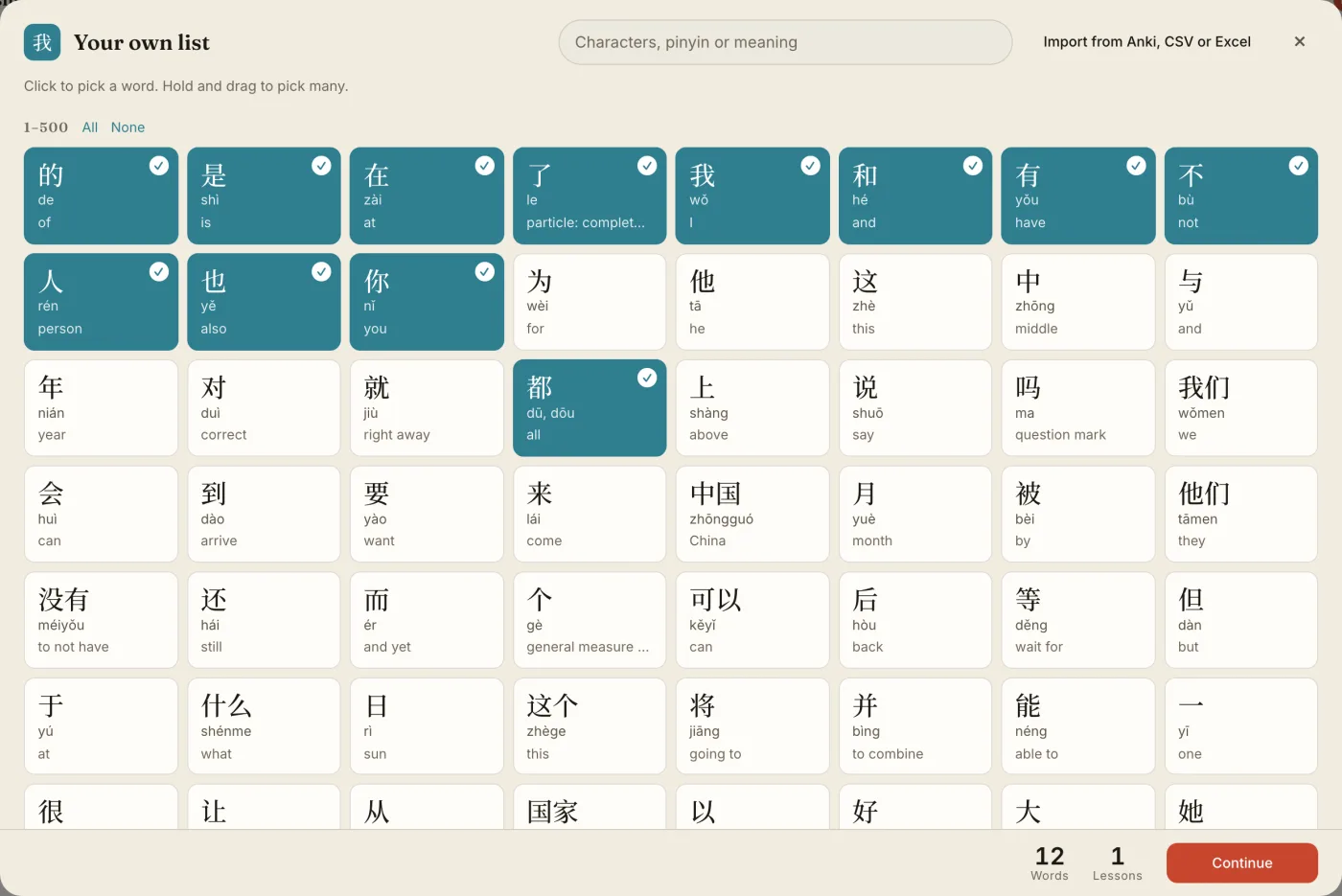
2. Pick your words. You see the 10,000 most common words as tiles, the most common first, in groups of 500. Each tile shows the word, its pinyin and its meaning.
- Click a tile to pick it, click again to drop it.
- Hold and drag to pick many at once, the way you pick photos on a phone.
- All and None pick or drop a whole group of 500.
- On a computer, Shift and click picks every word between two clicks.
The bar at the bottom counts your words and the lessons they make. A lesson is 20 words.
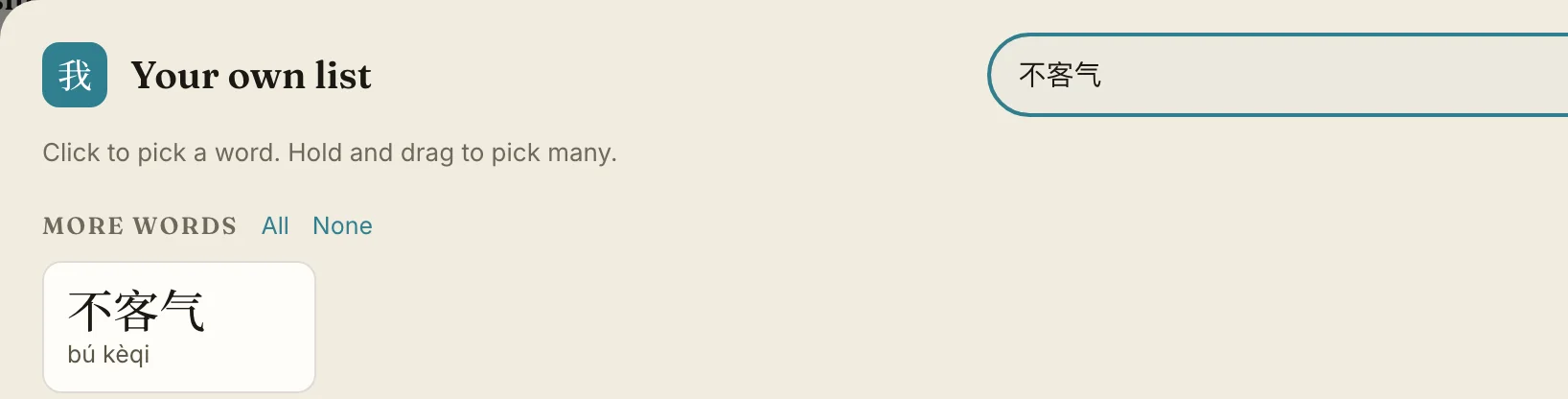
3. Search for a word. Type characters, pinyin with or without tones, or an English meaning. The search looks through every word in Gushi, more than 18,000, not only the 10,000 on the grid. Words outside the 10,000 show up under More words.
If Gushi does not have a word yet, it says so, and Suggest this word sends it to us. We look at every suggestion. A word that fits is added with its meaning, its own recording and its parts, made with the same care as every other word in Gushi, and you get a message in the app and by email once it is there. You never type a card yourself.
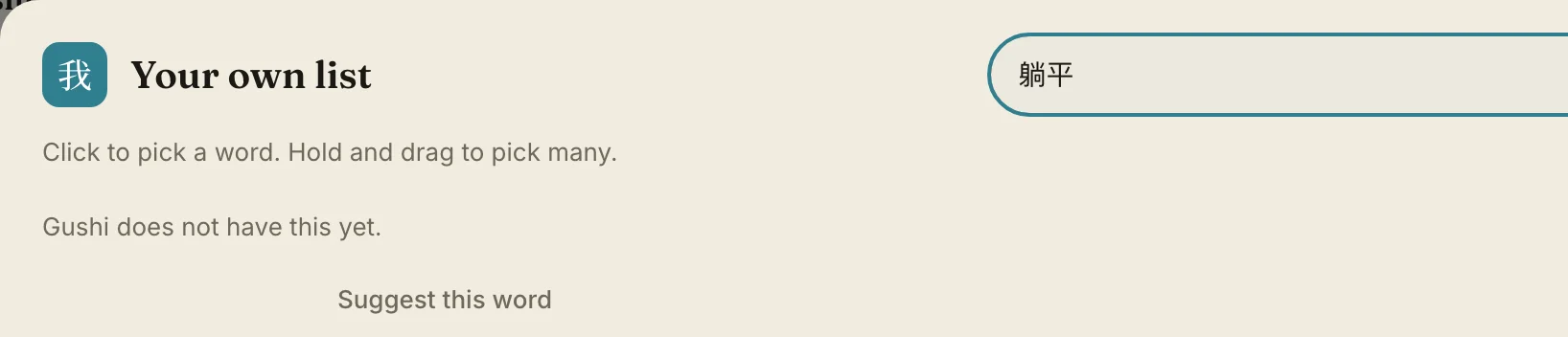
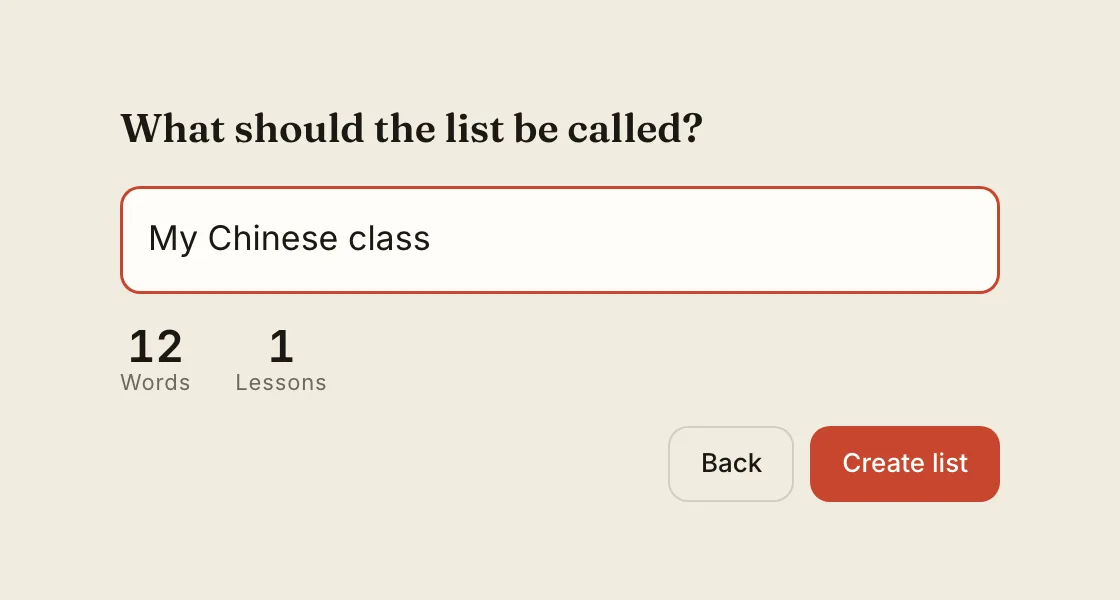
4. Name the list. Press Continue, give the list a name, and press Create list. Gushi offers to start it right away, at lesson 1.
Way 2: import a file
Import works in the web app only, on a computer or a tablet, at learn.gushichinese.com/import. The phone apps send you there with a link. The list you make there is on your phone too.
1. Open the import. Go to the address above, or press Import from Anki, CSV or Excel in the picker or under Your own lists.
2. Drop the file, or paste words. Gushi reads:
| File | Where it comes from | What becomes a lesson |
|---|---|---|
| .apkg, .colpkg | Anki, exported as a deck package | Each subdeck |
| .csv, .tsv, .txt | Pleco, an Anki text export, any spreadsheet saved as text | A column with a lesson or a tag |
| .xlsx | Excel, Numbers, Google Sheets | A lesson column, or one lesson a sheet |
| Pasted text | Anything you copy, one word a line | Lessons of 20 |
3. Check what Gushi found. It finds the column with the Chinese in it by itself, and reads a pinyin column if there is one. It tells you how many words it found and how many lessons they make. It also says which words had more than one reading and which one it took, and which words it could not find. A word that is not found is listed, never silently left out. To get a missing word into Gushi, search it in the picker and press Suggest this word.
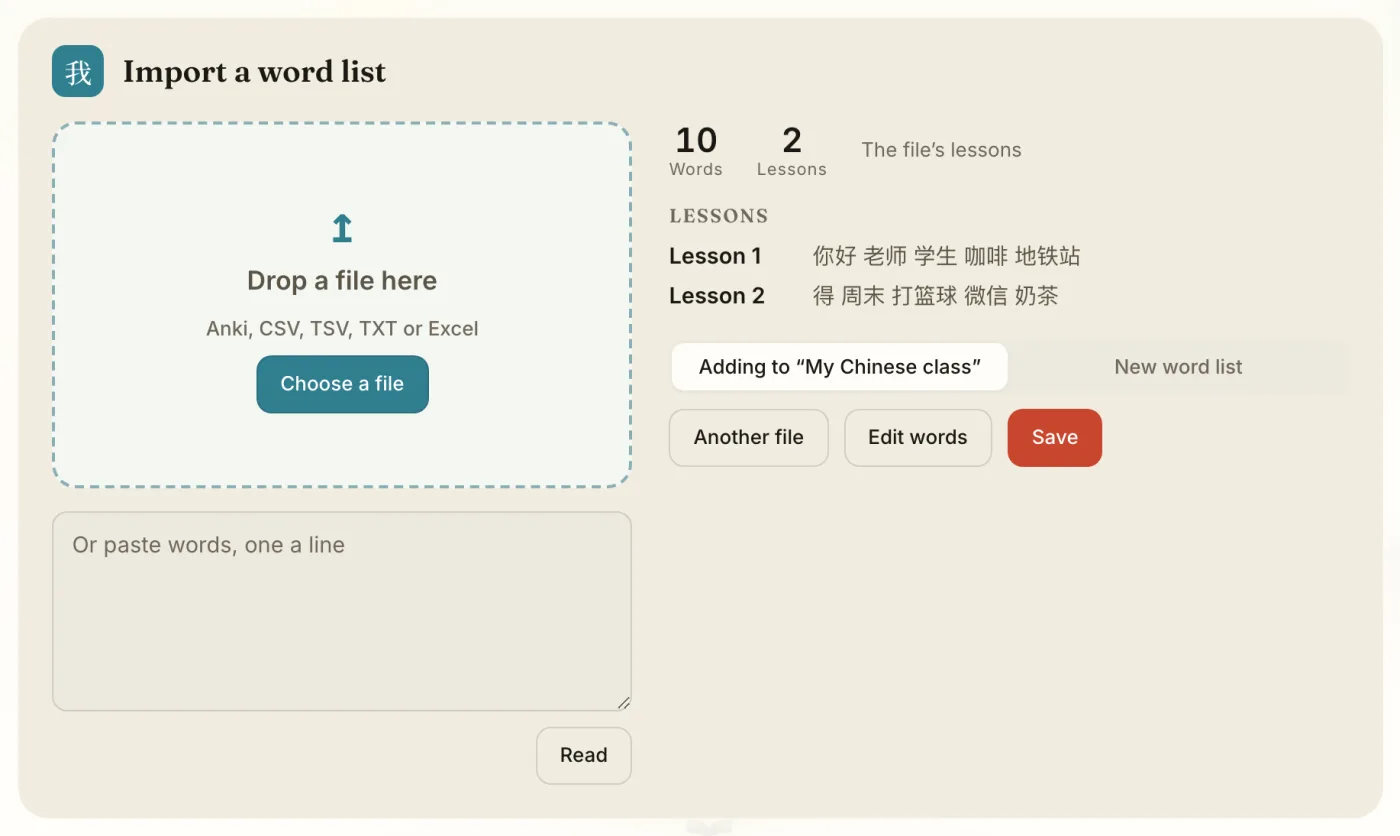
4. Save. A new list asks for a name. If you are already learning a list of your own, Gushi offers to add the file to it, as new lessons after the ones you have. That is how you add next week's sheet without starting over.
Three things the import does for you. A file in traditional characters is read as simplified where Gushi has the word: 老師 becomes 老师. A pinyin column decides between readings, so 得 with "děi" is "must", not the particle. And a row Gushi does not know as one word is split into the longest words it does know.
What happens after you save
Your list is now your learning path. Gushi teaches it lesson by lesson, like a textbook. Each word comes with its characters, and each character with its parts and its story, so you remember why it looks the way it does. After that, spaced repetition brings every word back just before you would forget it.
You can change the list at any time. Open Settings, press the pencil on your list, and pick or drop words. The words you keep stay in their lessons, so the lesson you are in does not move. New words go into new lessons at the end. If you delete a list, your progress on its words stays.
Where it stops
- One path at a time. You learn your own list, or HSK, or a textbook, not two at once. To add a few words beside your path, star them in the Library instead.
- A missing word waits for us. More than 18,000 words are in the app, and we add the ones learners suggest. Until a word is added, it cannot go on a list.
- The file import is on the web only. Phones pick words, they do not read files.
- Your Anki reviews do not come along. Gushi imports the words, not their history, so every word starts fresh in Gushi's review plan.
- A list is yours alone. To give one list to a whole class, a teacher makes a school list on the Gushi teacher platform.
- Limits: 50 lists per account and 30,000 words per list.
Gushi is one month free, then a subscription. See the app. Not sure which app suits you? The best apps for HSK 3.0 compares seven, ours too.
Frequently asked questions
Can I make my own Chinese vocabulary list in Gushi?
Yes. Pick words from the 10,000 most common words on the iPhone, on Android or in the browser, or import a file in the web app. The list becomes your learning path, cut into lessons of 20 words.
Can I import my Anki deck?
Yes, in the web app at learn.gushichinese.com/import. Export the deck in Anki as a deck package (.apkg) and drop it on the page. Subdecks become lessons. Your Anki review history does not come along.
Can I import my Pleco flashcards?
Yes. Export them from Pleco as a text file and import that file. Pleco's categories become lessons.
How are the 10,000 most common words chosen?
By how often each word appears in modern Chinese text. We use a public word frequency list, and the most common word, 的, comes first.
What if my file uses traditional characters?
Gushi reads them as simplified wherever it has the word, so 學生 is learned as 学生.
Can I add words to my list later?
Yes. Edit the list in Settings to pick more words, or import another file while you learn the list and choose to add it. New words go into new lessons at the end.
Does Gushi have words outside the HSK?
Yes. Besides the 11,000 HSK 3.0 words, it has the words of the textbooks it follows. Together that is more than 18,000 words, and every one can go on your list.
What if a word I need is missing?
Search it in the picker and press Suggest this word. We look at every suggestion, add the words that fit with their meaning and their own recording, and tell you in the app and by email once they are there.